

Templates
Templates are reusable campaign configurations that combine domains, email delivery settings (SMTP or API), email designs, and page flow.
Overview
The templates overview displays all available simulation templates, their configuration status, and associated components.
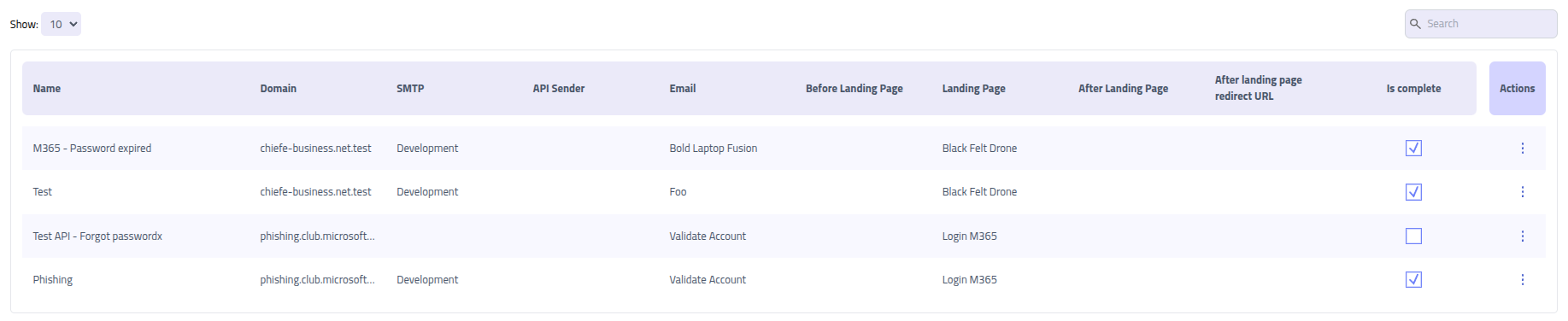
| Component | Description |
|---|---|
| Template Name | Descriptive identifier for the template configuration |
| Domain | Configured domain for hosting phishing landing pages |
| SMTP Configuration | SMTP server settings for traditional email delivery |
| API Sender | API-based email delivery service configuration |
| Email Template | Pre-designed email content used for phishing lures |
| Before Landing | Optional initial page or proxy page used before the main phishing page |
| Main Landing Page | Primary phishing page or proxy page |
| After Landing | Optional post-capture proxy for extended simulation scenarios |
| Completion Status | Indicates if template is ready for use. Incomplete templates may have missing or deleted required components |
Creating new Templates
Prerequisites
Before creating a template, ensure the following components are configured:
- Domain Configuration - Configured domain for hosting phishing pages
- Email Delivery Method - Either an SMTP sender or API sender for email delivery
- Email Template - Designed phishing email content with appropriate lures
- Page - At least one landing page or proxy
Begin template creation by clicking New Template on the templates page to access the
configuration wizard.
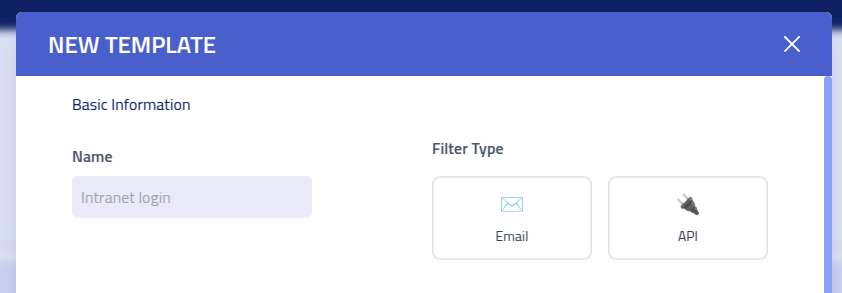
Basic information
| Setting | Description |
|---|---|
| Template Name | Descriptive name to identify this template configuration |
| Delivery Method | Choose between SMTP server delivery or API-based email sending |
| Awareness training | Marks the template as an awareness training template. Campaigns built from it record training started and completed instead of phishing page visits and submissions, and require an after page for the completion summary |
Delivery Configuration

| Component | Description |
|---|---|
| SMTP Configuration | Pre-configured SMTP server settings for traditional email delivery |
| API Sender | API-based email service configuration for advanced delivery options |
| Email Template | Pre-designed email content that will be sent to recipients |
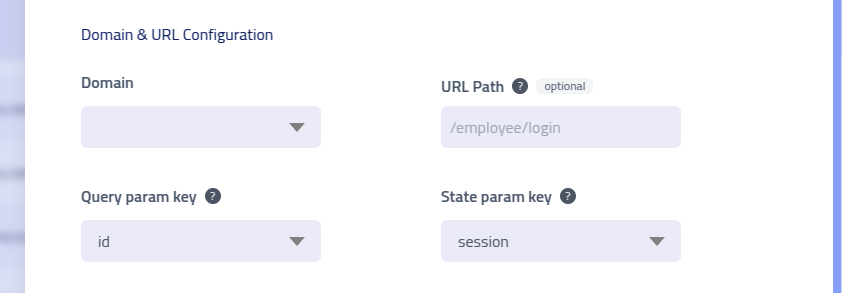
Domain and URL Configuration
| Setting | Description |
|---|---|
| Domain Selection | Choose the configured domain for hosting phishing landing pages |
| URL Path | Custom path segment added to domain URLs for added realism and context (e.g., /login, /secure, /update) |
| Lure URL Format | Chooses how the delivered link identifies the recipient. Query parameter
appends the recipient ID to the query string, for example
https://example.com/login?id=6ba7b810-9dad-11d1-80b4-00c04fd430c8.
Path code appends a short code as the final path segment instead, for example
https://example.com/login/4H7K9QM2XR3T |
| Code Format | Symbol set a generated code is drawn from. Crockford base32 is upper case
without I, L, O and U. Base58 is mixed case without 0, O, I and l, and needs
fewer characters for the same number of combinations. Only applies to the path code format |
| Code Length | Number of characters in a generated code, between 6 and 16. The form shows how many combinations the chosen format and length produce. Only applies to the path code format |
| Query Parameter Key | Parameter name used in URLs to identify individual recipients. Customizable for URL authenticity. With the path code format the delivered link does not use it, but the pages after the first click still do |
| Session State Key | Parameter for recording multi-page navigation flow when using sequential landing pages. Always a query parameter, including with the path code format |
Path Code Lure URLs
A query string carrying a UUID is hard to read aloud and survives poorly in an SMS, a QR code or a printed note. The path code format replaces it with a short code so the link stays usable in those channels.
Codes are allocated per recipient when the campaign is scheduled, and the format, length and symbol set are taken from the template at that moment. Editing the template afterwards does not change codes already issued.
Both URL forms always resolve, whichever format the template is set to. Switching a template between the two does not break links that have already been delivered.
Note: in the path code format the code becomes part of the URL path, so relative
asset references inside a landing page template resolve one level deeper. Use
{{.BaseURL}} for assets in landing pages that may be used with this format.
Page Flow Configuration
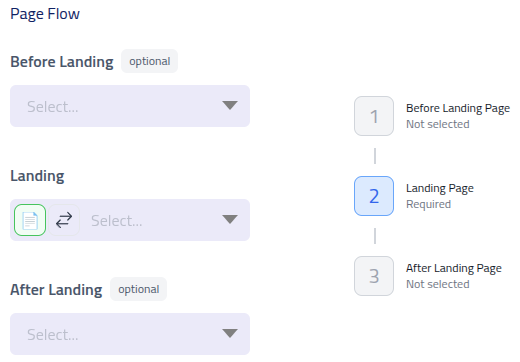
The page flow defines the user journey after clicking the phishing email link. This sequence can include multiple pages to create attack scenarios.
| Page Type | Purpose and Description |
|---|---|
| Pre-Landing Page | Initial page for user engagement, credential collection, or traffic filtering before the main simulation |
| Pre-Landing Proxy | Initial proxy configuration for intercepting traffic to legitimate websites before the main campaign interaction |
| Main Landing Page | Primary phishing simulation page where user interactions and data collection occur |
| Landing Proxy | Primary proxy configuration for main campaign interaction, capturing credentials and session data from real applications |
| Post-Landing Page | Redirect page shown after interaction completion. Used for displaying information or redirection |
| After Landing Proxy | Post-capture proxy interaction for additional data collection or extended simulation scenarios |
| POST Redirect URL | Gophish compatible URL. (Campaign URL in Gophish) Use this keep the behavior of Gophish campaign, were after the final POST request, it redirect to this URL to complete the campaign for the recipient. Note: Does not work with proxy configurations. |